
Intro to IoT Class Docs
Tech TLH Discord Code and Coffee TLH GitHub Toggle Dark/Light/Auto mode Toggle Dark/Light/Auto mode Toggle Dark/Light/Auto mode Back to homepage

Getting The Time

Using NTP with ezTime

Network time is served by NTP, and we can contact a server to be synced with everything from laptops to cell phones. ezTime stays true to its name and keeps things simple.

To add it to the sketch, we just need to tell the compiler to #include <ezTime.h>.

First NTP needs to be contacted with waitForSync(). This does DNS translation, finds an appropriate server, calculates network delay and other things that fix the clock.

Getting the time zone right takes a little more. We need a Timezone variable to store the local zone and daylight savings info, and need to call a second server to get that populated. Serial statements can be used like they were with WiFi to show that status.

The ISO 8601 standard just provides a common way to describe time and keep people from fighting over whether the month or day goes first.

 1
 2
 3
 4
 5
 6
 7
 8
 9
10
11
12
13
14
15
16
17
18
19
20
21
22
23
24
25
26
27
28
29
30
31
32
33
34
35
36
37
38
39
40
41
42
43
#include <WiFi.h>
#include <ezTime.h>

#define WIFI_SSID "code"
#define WIFI_PASS "andcoffee"

Timezone local;

void connect() {
  Serial.print("connecting to wifi...");
  while (WiFi.status() != WL_CONNECTED) {
    Serial.print(".");
    delay(1000); // 1 second delay
  }
  Serial.println("done.");
  Serial.print("IP address: ");
  Serial.println(WiFi.localIP());

  // NTP
  waitForSync();
  Serial.print("getting time zone...");
  while (!local.setLocation("America/New_York")) {
    Serial.print(".");
    delay(1000);
  }
  Serial.println("done.");
  Serial.print("current time: ");
  Serial.println(local.dateTime(ISO8601));
}

void setup() {
  // put your setup code here, to run once:
  Serial.begin(115200);
  delay(10); // 10 millisecond delay
  WiFi.begin(WIFI_SSID, WIFI_PASS);

  connect();
}

void loop() {
  // put your main code here, to run repeatedly:

}

Ready To Burn Again

With the board plugged in to USB, go ahead and upload it with time info. The serial monitor will now show it updating with the current time and zone.
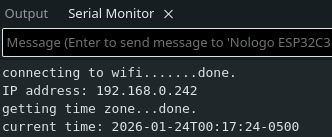
Good Job, Board.
Good Job, Board.

Next Up: JSON Message