
ESP32 Board Package
Now that the IDE is installed, we need to tell it how to write to ESP32 boards.
- Open Arduino IDE.
- In the left icon list, click on the second one. It’s the weird looking one. Maybe it’s a one-eyed robot?
- In the blank box directly below BOARDS MANAGER, search for
espressif. - esp32 by Espressif Systems is the one we’re working with. Go ahead and click Install below the description.
- Downloading the package may take a minute or two, and Install will change to Remove as seen below.
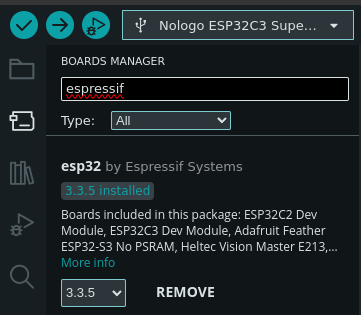
Installing the Espressif Board Package
There are a ton of esp32 boards available. They’re not quite in alphabetical order, either, so this may require a little patience.
To find the board, go to: Tools > Board > esp32 > NoLogo ESP32C3 Super Mini

That’s it! On to setting up Additional Packages